Table of Contents
1. Introduction: How to Use Midjourney
If you are searching for How to Use Midjourney, this guide will take you from absolute beginner to advanced user step by step.
Midjourney is one of the most powerful AI image generation tools in the world, capable of turning simple text into highly detailed, professional-quality images.
You don’t need:
- ❌ Drawing skills
- ❌ Photoshop experience
- ❌ Graphic design background
- ❌ 3D modeling knowledge
You only need:
✍️ The ability to describe what you want in words
Why this guide is different
Most tutorials only show “how to click buttons”.
But this guide explains:
- How Midjourney actually works
- How to write professional prompts
- How to generate business-level images
- How to avoid beginner mistakes
- How people use Midjourney to make money
What you will learn
After reading this guide, you will know:
✔ How to set up Midjourney
✔ How to write powerful prompts
✔ How to control image style
✔ How to generate professional images
✔ How to use Midjourney for business
2. What Is Midjourney (Deep Explanation)
Midjourney is not a simple “image generator”.
It is an AI system based on diffusion models, which convert text into images.
Simple explanation
Think of it like this:
You describe an image → AI imagines it → AI draws it pixel by pixel
How it works (step-by-step)
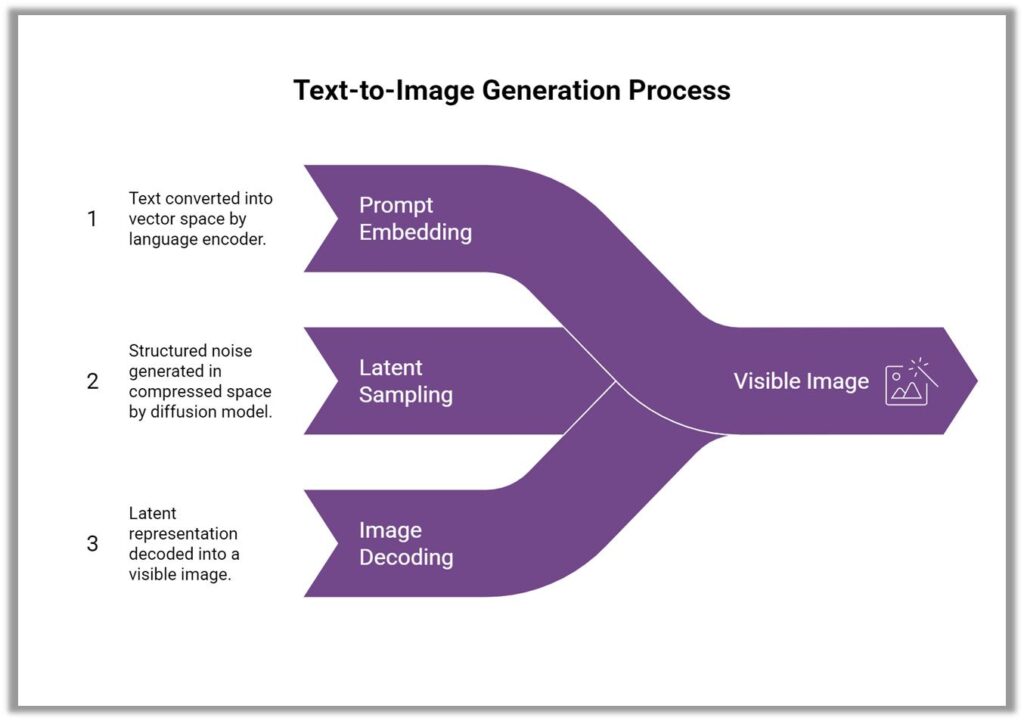
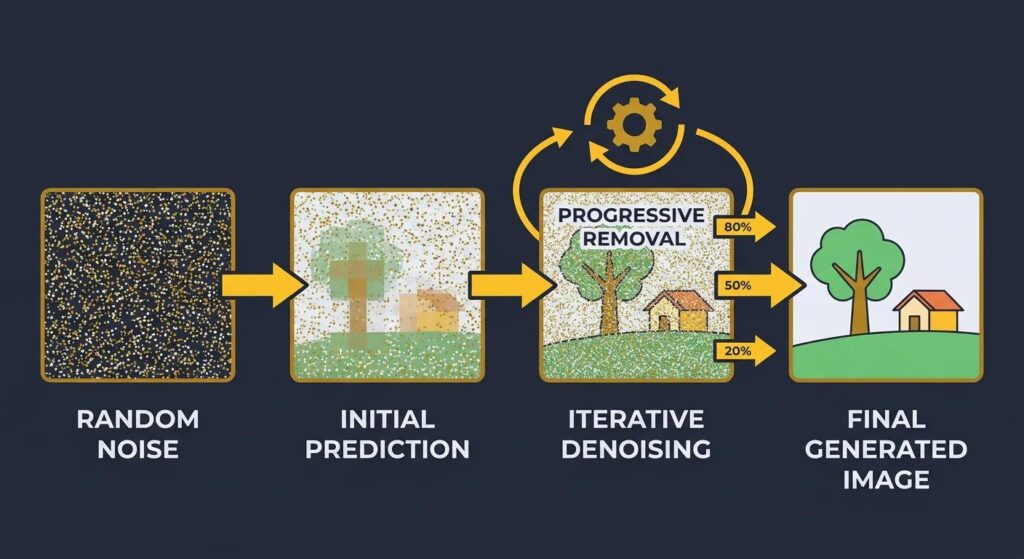
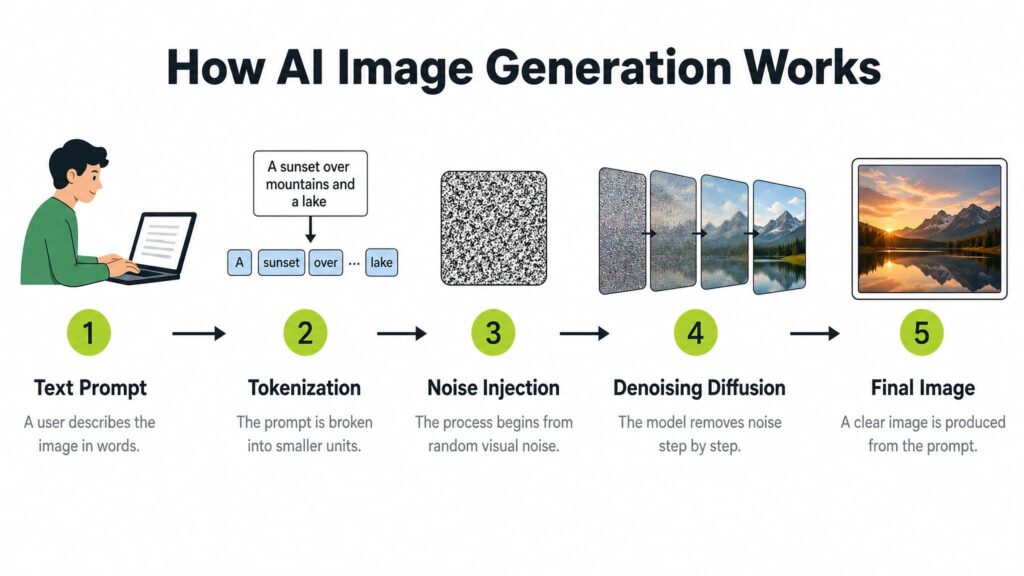
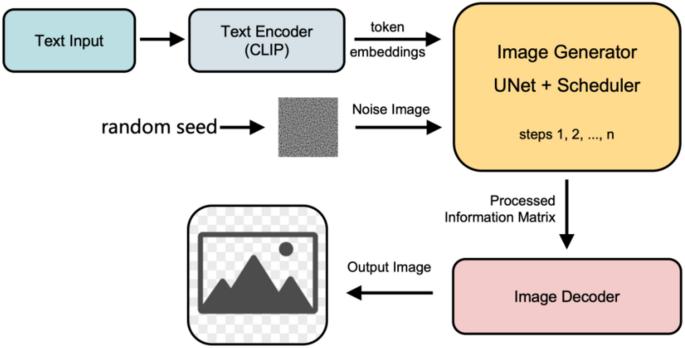
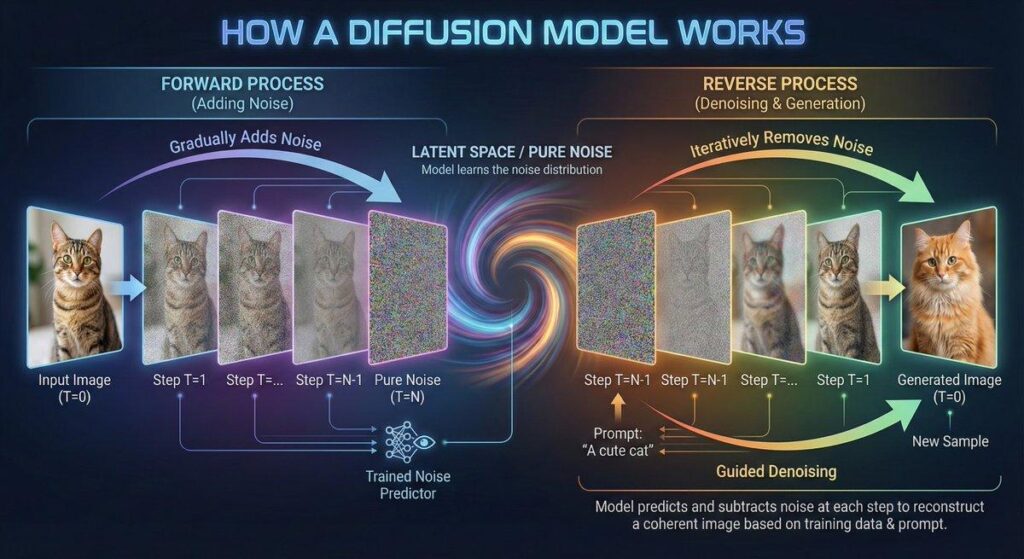
- You type a prompt
- AI breaks it into concepts
- AI starts from noise
- AI refines structure
- AI generates final image
Why Midjourney is powerful
- It understands natural language
- It generates artistic styles automatically
- It can simulate lighting, camera, composition
- It produces commercial-level visuals
3. Why Midjourney Uses Discord


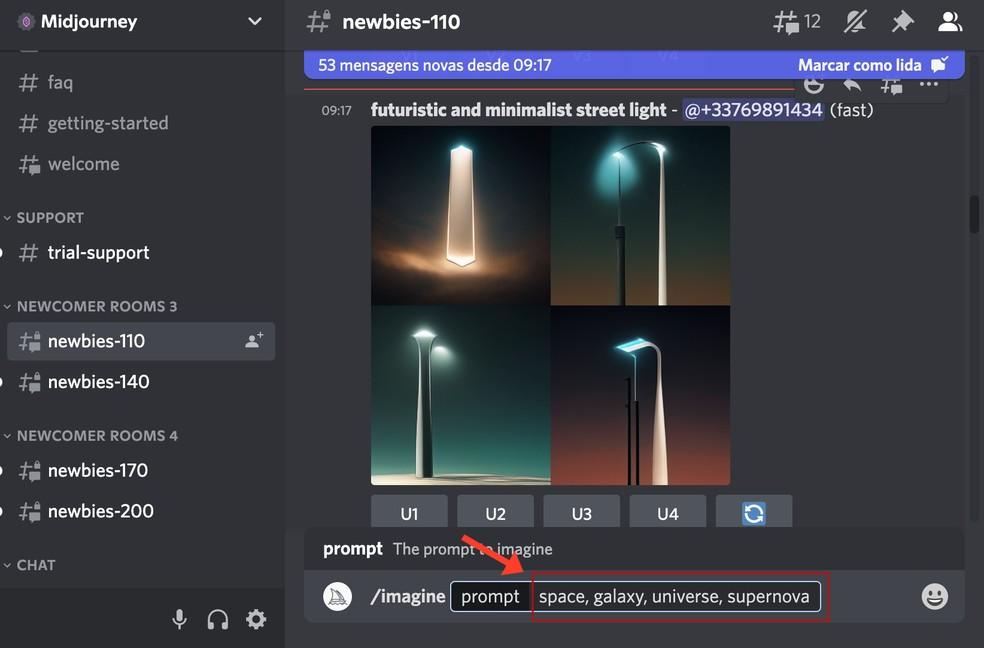
Unlike traditional software, Midjourney runs inside Discord.
Why?
Because:
- It allows real-time AI generation
- It supports community interaction
- It is easy to scale globally
- It avoids building heavy software apps
Main components you will use
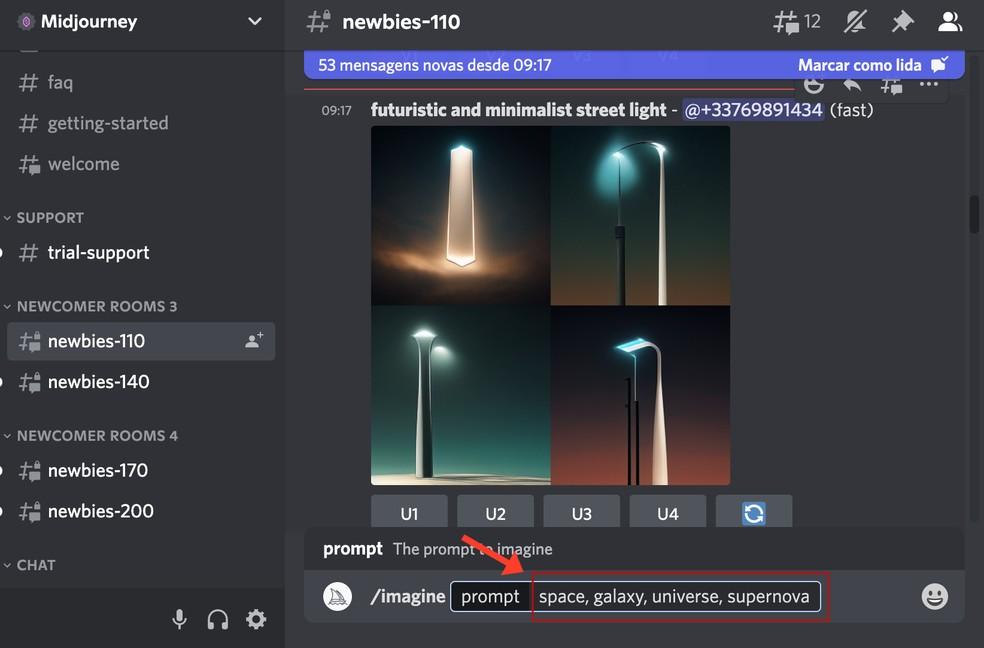
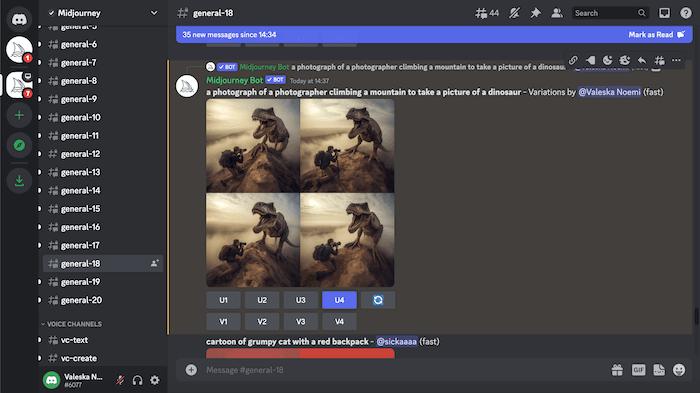
- /imagine command
- #newbies channels
- Image grid outputs
- Upscale & variation buttons
4. How to Start Midjourney (Beginner Setup Guide)
Step 1: Create a Discord account
Go to Discord official website and register:
- Username
- Password
Step 2: Join Midjourney server
After login:
- Join official Midjourney server
- Accept invitation
Step 3: Find beginner channels
Look for:
- #newbies-1
- #newbies-2
- #general
Step 4: Subscribe to Midjourney


6
Midjourney is NOT fully free.
It requires a paid subscription.
Plans usually include:
- Basic Plan
- Standard Plan
- Pro Plan
5. Your First Command: /imagine
This is the most important feature in Midjourney.
Basic format
/imagine prompt: a futuristic city at night, neon lights, cinematic style, ultra realisticWhat happens next
Midjourney will generate 4 images.
Then you can:
- U1–U4 → upscale image
- V1–V4 → generate variations
- 🔄 reroll → regenerate
6. Understanding Prompts (MOST IMPORTANT SECTION)


Prompt = instruction you give to AI.
❌ Bad Prompt Example
dogProblem:
- No style
- No detail
- No environment
Result: low-quality image
Good Prompt Example
a golden retriever sitting in a sunny park, soft natural lighting, shallow depth of field, ultra realistic, 8k, cinematic photography styleResult: professional image
7. The Perfect Prompt Formula
Use this structure:
Subject + Environment + Lighting + Style + Details + CameraExample
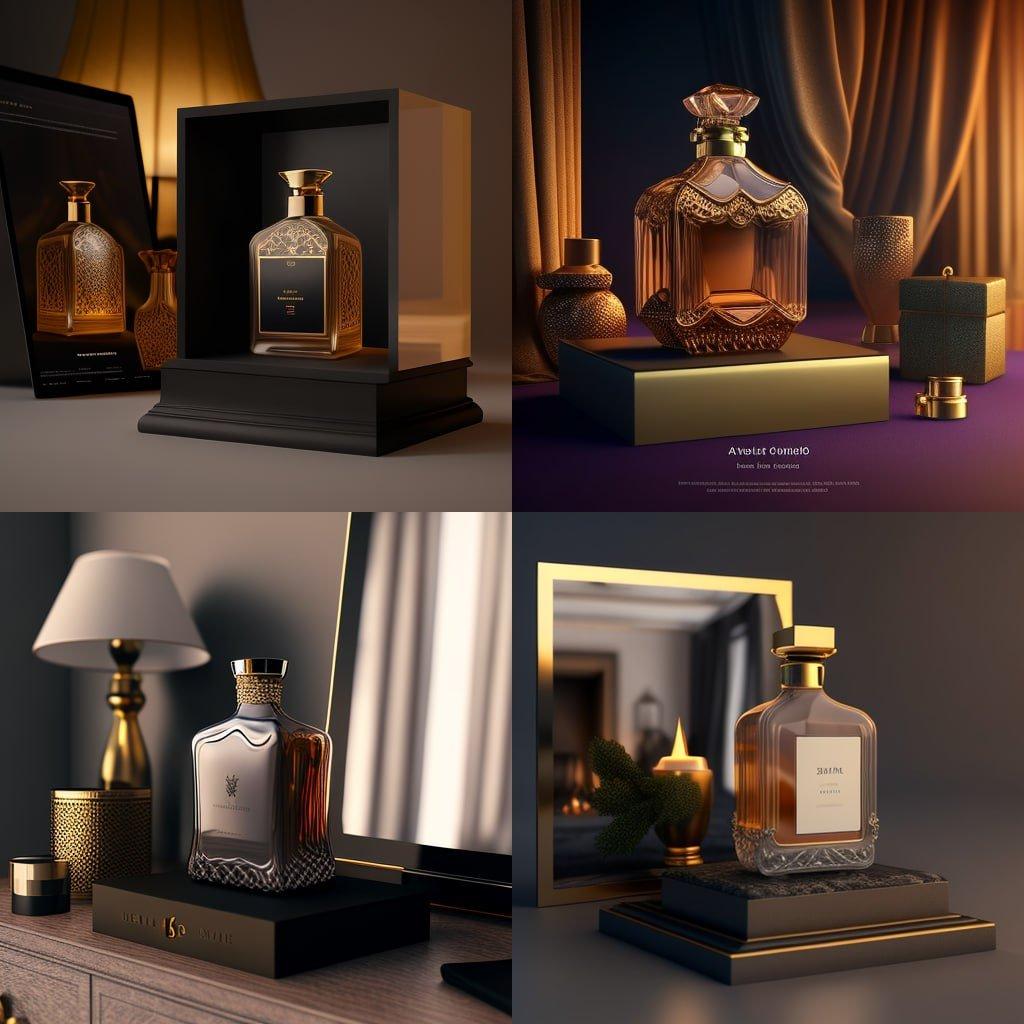
luxury perfume bottle on marble table, soft studio lighting, high-end commercial photography, ultra realistic, 8k, shallow depth of field8. Advanced Prompt Techniques
Style control
- cinematic
- anime style
- 3D render
- watercolor painting
- product photography
Lighting control
- soft light
- neon lighting
- golden hour
- studio lighting
Camera control
- 35mm lens
- depth of field
- wide angle
- macro shot
9. Midjourney Parameters (PRO LEVEL)
Aspect ratio
--ar 16:9Used for YouTube thumbnails.
Stylize
--stylize 100Controls creativity level.
Chaos
--chaos 50Controls randomness.
Version
--v 6Model version.
10. Real Use Cases (VERY IMPORTANT FOR SEO)


1. E-commerce
- Product ads
- Amazon images
- Shopify banners
2. YouTube
- Thumbnails
- Channel branding
3. Social Media
- Instagram posts
- TikTok visuals
4. Branding
- Logos
- Brand identity
11. Common Beginner Mistakes
❌ Mistake 1: One-word prompts
Example: “car”
❌ Mistake 2: No style keywords
Always add:
- lighting
- style
- detail
❌ Mistake 3: Ignoring composition
Bad composition = bad image
❌ Mistake 4: Not using variations
Most beginners stop too early
12. Midjourney Pricing


5
| Plan | Price | Features |
|---|---|---|
| Basic | ~$10 | limited usage |
| Standard | ~$30 | more generations |
| Pro | ~$60 | commercial use |
13. Midjourney vs Other AI Tools
| Tool | Strength |
|---|---|
| Midjourney | Best image quality |
| DALL·E | Easy integration |
| Leonardo AI | Game assets |
| Canva AI | Templates |
14. Is Midjourney Worth It?
Yes, if you are:
- Content creator
- E-commerce seller
- Designer
- Blogger
Not ideal if:
- You want free tools only
- You don’t want to learn prompts
15. FAQs
Is Midjourney free?
No.
Do I need Discord?
Yes.
Can I use it for business?
Yes.
Is it beginner friendly?
Yes, but you need to learn prompts.
16. Final Conclusion
Midjourney is one of the most powerful AI tools in 2026.
If you master it, you can:
- Create professional images
- Build content faster
- Save design costs
- Start AI-based business